Showing posts with label tips social networking sites. Show all posts

Follow Me On Twitter Flash/SWF Widgets For Blogger And Website

Twitter is a world famous social networking sites for bloggers to promote their blogs. Here, I will show you how you can add very cool Twitter Blogger widget to your blogs and websites. Widgets are based on Flash animations and have some nice effects. These buttons can help Twitter Flash Spice up your blogs, Websites and can help you gain more followers on Twitter. These are designed and developed by www.twitterflash.net.

Features:

1.) SWF Files.
2.) Adjustable Size.
3.) Cute Animation.
4.) Link To Twitter.
5.) Different Background Colors.

How To Add In Blogspot?

1.) Go To Your www.blogger.com
2.) Open Your Desire Blog.
3.) Go To Layout.
4.) Click "Add A Gadget" Where You Want To Add It.
5.) Now Scroll To "HTML-JAVASCRIPT"
6.) Click "+" Icon To Add It.
7.) Now Get The Code From The Below Site.
8.) Leave The Title Empty.
9.) Click Save, Now You Are Done.

How To Add In Website?

1.) Just Go To Your HTML File.
2.)  Now Get The Code From The Below Site And Paste It Between <body> </body>.
3.) Save It, Now You Are Done. 

Click Here For Website

Submit your post to Tumblr, Linkedin, Facebook and Twitter automatically free

|0 comments
Every blogger expects a good traffic for his websites after doing a hard work on his blog or website. Today we have got a great online tool that can submit your blog post to Tumblr, Linkedin, Facebook, Twitter. The most amazing thing about this tool is that you do not have to submit your blog post manually after every post made by you. It will automatically post on behalf you. This amazing tool name is dlvr.it. You have work one time in your blog and it will work for you every time. Before going to submit your blog to social networking sites, you must have to create a feed for your blog. If you have already created feed for your account then just go ahead.

Create an account in dlvr.it, If have you not an account on dlvr.it. After creating the account login to your account and you will see on the left side :
Put your blog feed address in feed url. After that select which post you want to publish on these sites and click on next button. Now, you will see on the right side of the page.
Click on any icon in which you want to publish your blog post first. In my case we have clicked first facebook icon. After clicking on facebook you will get a window like this :
Now click on 'Log in with Facebook' button, and provide your user name and password of facebook. 
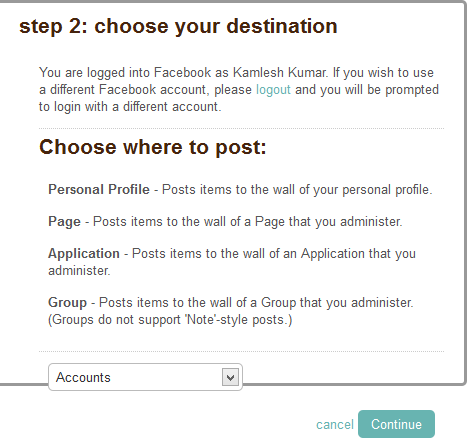
Click on Allow to allow button. Now it will ask for on which account you want to publish.
Click on Accounts tab and select appropriate account on which you want to post your article automatically and click on continue button. Now you will see a window like :
Here, on the left side your blog heading and right side facebook link page is available. Now you every post will be automatically posted to facebook.
To add another e.g Tubmlr, Linkedin, Twitter just click on +add button and follow the steps.
Share