Showing posts with label tricks gpedit. Show all posts

Make Windows computer check for Windows Updates more frequently in a day

|0 comments

The Windows 8 operating system checks Windows Updates periodically. By default by microsoft, such checks are set at every 22 hours. But practically, the checks take place anytime between 17.6 hours and 22 hours.
But, if you wish to make your Windows 8 check for updates more frequently. The same applies to Windows 7 too.

Follow the simple steps :

1. Press Windows Key + R simultaneously from keyboard Run window.

2. Type gpedit.msc and hit enter from keyboard.
3. Now, Click on Local Computer Policy > Computer Configuration > Administrative Templates > Windows Components > Windows Update.
4. Here from the left side pane, double-click on Automatic Updates detection frequency.
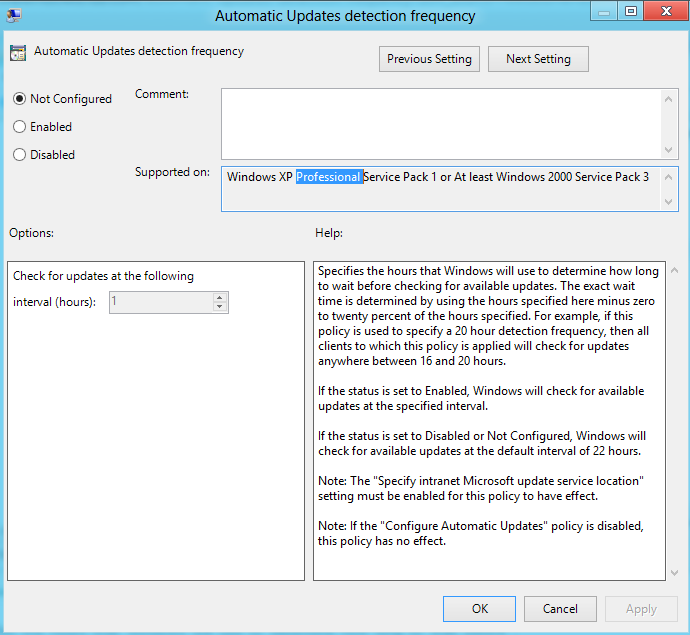
This setting specifies the hours that Windows will use to determine how long to wait before checking for available updates. The setting is not exact. While you may set an exact time, the check will occur anytime between the specified time and up to 20% before that time. This means that if you set the time at 20 hours, the check will take place anytime between 16 hours and 20 hours.

The default status is set at Not Configured. If it is set at this or at Disabled, Windows will check for available updates at the default interval of 22 hours.

If the status is set to Enabled, Windows will check for available updates at the specified interval.

Click on Enabled to change the time. From the Options available, change the time to check for updates at the following interval in hours.

Once done, click Apply and OK.

How to Fix Access Denied to gpedit.msc Problem

|0 comments
You may have earlier faced the problem that gpedit.msc was not working on your system. When in your PC gpedit.msc will not work then try to open the other commands with msc extensions, that will also not work like services.msc, devmgmt.msc, compmgmt.msc etc.

When you try by double clicking the gpedit.msc inside the windows\system32 folder then you will get same error “Access is Denied” even if you will try through administrator account. 


Solution to "Access is Denied" in gpedit.msc and other commands :


First Method


Try to restore your system at earlier system restore point. It may help you.


Second Method

Since the problems vary for different users, installing Microsoft Management Console 3.0 for Windows XP may also work for you.


Download MMC


Third and best Method

Open Registry Editor (regedit.exe).
Now traverse to HKEY_CLASSES_ROOT\.msc and delete the registry entry on the right side.
After deleting it when you will try to run gpedit.msc, it will open an “Open with” dialog box.

Now select the second option and browse to get a new option; browse to C:\Windows\system32\mmc.exe

A new option “Microsoft Management Console” will appear in the window.
Select this option and remember to check the box below to always run the command without doing this again and again.

Now you will be able to open all .msc extensions commands easily.


Share
