Showing posts with label tricks airtel. Show all posts

HOW TO FIND THE MOBILE NUMBER OF ANY SIM CARD

|1 comments
How to know your own mobile number if you have forget and there is only easy recharge available and you have to recharge immediately your mobile? A question which arises in most of our minds when we have forgotten our mobile number when we are upto a flexi recharge due to low balance. All network providers in India including Airtel, Aircel, Tata Docomo, Idea, Reliance gsm, Vodafone .... have options for their customers to view their own mobile number toll free without calling the customer care numbers. You can now know your mobile number by typing the number for your operator given below :
Most of network provider support *1# or *#1# code. Just dial and get your mobile number on the screen. If it does not work then follow the proper code :
  • Aircel customers dial *122*131#
  • Reliance gsm dial *1# to know your mobile number
  • Tata Docomo users can dial  *580#
  • Tata Indicom users can dial *580#
  • Airtel dial *121*9#
  • Idea users can dial *1#
  • Vodafone dial *111*2#
  • Loop usersJust dial *222# 
  • Virgin users Just dial *1# or *580#
  • Smart users Just dial *2#
  • Videocon users Just dial *1# 
  • Uninor users Just dial *555# to know your mobile number
All code has been tested in West Bengal and working 100%.

More coming soon. Suggestions are always welcome.

How to Unlock Huawei Airtel E173CS-1 Free Now

|0 comments

I have already provided the article about how to flash Airtel Huawei E173CS-1 latest firmware and how to generate 86 series IMEI unlock code. But, recently when I was unlocking some Airtel Modem, a few modems was asking for unlock code while putting another SIM on the modem but some of them was not asking for unlock code. Hence, we are proving the article for those modems who does not ask for unlock code after flashing the modem also.

Steps :

1. After flashing the airtel E173CS-1 modem download the Huawei Modem Code Writer Tool from the link provided below after the article.

2. Extract the zip file and run the HUAWEI MODEM Code Writer.exe.
3. Now plug your flashed airtel modem in your computer.

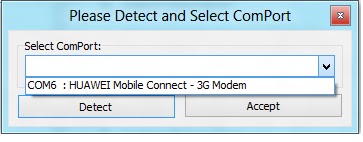
4. Now click on "Please Select Com Port" button and it will open a small window.
5. Click on Detect button and select the port.
6. After selecting the Com port click on Accept button. 

7. Now click on Unlock Modem button.
8. Now its will open a new windows asking for unlock code.

Unlock code generator for 86 series IMEI free

|1 comments
I have already provided article about How to Flash Airtel Latest Custom Firmware 21.157.13.00.284 Free. After flashing the modem when you insert another SIM into Airtel modem then it asks for unlock code. But in this post we have not given the unlock code procedure. Hence we are explaing here how to can generate the code for Huawei Firmware of 86 series IMEI.

Steps by step guide :

1. First download the DC-Unlocker latest version from the link provided after the article.

2. Insert any Huawei Modem in your computer and let it install all the software and drivers of modem. After installing the driver connect to the internet.

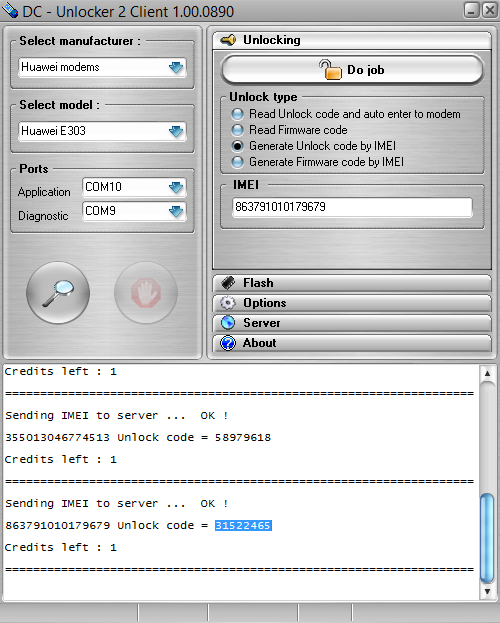
3. Now run dc-unlocker software which you have downloaded from the link below and click on search box.
4. It will search for your modem and display in text box.
From here tricks start.

5. Now go to server tab and put in User name : newhuawei and in Password put : freetest
6. Now go to Unlocking tab and click on 'Generate Unlock code by IMEI'
7. Now In 'select model' change model as Huawei E303 and in IMEI box write IMEI of your airtel modem and press the button Do Job.
8. In a few second you will get a unlock code of your new 86 series IMEI number. 

9. Now plug your flashed airtel modem with another network provider SIM.

10. Now your modem will ask for unlock code.

11. Just provide the unlock code you have got through DC-Unlocker software and click on OK button.

And you have successfully unlock your latest firmware airtel modem. Enjoy.

Proof for unlock airtel

UNLOCK HUAWEI AIRTEL E1731 CUSTOMIZED FIRMWARE VIA FIRMWARE UPGRADE

|0 comments

Network providers keep launching new modem in the market. Recently after idea cellular now Bharti airtel also comes with a new model E1732 which has customized firmware and its firmware version number is  11.126.16.04.284 and software version is 16.001.06.07.254 Fakiro. We have got the firmware which will help you to unlock your new Airtel E1731.

Requirement to unlock the huawei airtel e1731 customized firmware :-

E173 Firmware (Download it From Here)
Universal master code (Download it From Here)

Unlocking Procedure Step by Step :-

1. First of all generate unlock and flash code using Universal Master code Calculator  or you can do it online by using our online code calculator.
2. Now plug your device to your laptop/Desktop then Run E173Update_11.126.85.00.114_B427.exe  it will find your modem automatically. If your modem could not be found then just restart your computer and try again.

After a few minutes your modem will be unlocked for any SIM. Now you can use any sim of your choice. Only thing is that you have to crate a new profile for your new SIM.

Flash Airtel Latest Custom Firmware 21.157.13.00.284 Free

|0 comments
Airtel has recently launched Huawei Modem with Latest Custom Firmware 21.157.13.00.284. When you will see in modem printed you will get Huawei E1731 only. But when you will see in the inner side then you will get Huawei 173cu-1. Huawei cu-1 firmware is different from previous one. Before this airtel has launched modem with Custom Firmware  version 11.126.16.04.284 which is not unlocked in the market. Because, still Firmware 21.157.13.00.284 could not unlocked by hackers. Hardware version of Airtel E173Cs-1 is CH2E303SM. But, still we have a firmware flasher which works with this modem and it upgrade it to 21.157.13.00.910.B757. When you flash then you will be asked for a flash code. You can download Universal master code and just run this. 
Put your modem IMEI Number in appropriate box and just click on Calculate button. Now you will get Unlock code and Flash code. When you will flash your modem it will ask for a code, then provide flash code.

Now put another SIM in your modem and connect with your laptop. It's will ask for unlock code. You have already got unlock code for your modem through Universal master code. Don't use, because it will not accept. This software generates unlock codes for 35 series IMEI number, but if will see your modem inside you will get 86 series IMEI number. I have not got still unlock code generator for 86 series IMEI numbers. I will soon provide download link. 


Even DC unlocker does not support this modem till now. Just wait and keep track.

Share