Showing posts with label trick pdf. Show all posts

Soda PDF 3D Reader: Best PDF Reader App For Windows 8

|0 comments

After the soon release of Windows 8, developers started releasing Modern UI version of their popular desktop software. Lulu Software has recently released its free Soda PDF 3D Reader app for Windows 8 and is now available in the Windows Store to download.

Soda PDF 3D Reader application is great in many ways. For those who haven’t come across Soda PDF 3D Reader before, it’s a fantastic program to read PDF files in Windows 8. It includes smooth animations with great features which one  expect in a good PDF reader.
The Windows 8 version of Soda PDF 3D Reader includes pretty much every feature present in the desktop program. The best part of the app is its UI and smooth animations that you see when you move to the next or previous page. Options such as search, print, reading options appear when you right-click anywhere on the app. Moving the mouse cursor to the center of the page displays move to page number, next, forward, zoom in and zoom out options.

Overall, it’s the best free PDF reader app available for Windows 8. Soda PDF 3D Reader is compatible with both x86 and x64 as well as ARM-based processors. One who wants to download just open up the Store app, search for Soda PDF 3D Reader to visit the install page.

Extract Image from PDF : Free PDF Image Extractor

|0 comments

Users who involve more with PDF files and want to extract images from PDF files can try Free PDF Image Extractor. It is an easy-to-use and powerful tool which can help you extract images from PDF in seconds. 

Free PDF Image Extractor is a freeware and can be download from the link which is provided at the end of the article. It also supports drag and drop operation. Just launch the application and drag your PDF file upto the software and start extracting the images from PDF files. 
Key Features of Free PDF Image Extractor 1.3.0

  • Extract Images from PDF in quick, easy steps
  • Process thousands of PDF files at one time
  • Keep the quality of the image files the same.
  • Lifetime upgrade for free
  • No Adware/Spyware/Virus guarantee
  • Streamlined user interface.
  • Win7 Integration.

It supports Windows 7/Windows Vista/WinXP/Windows 2000.

Download PDF Image Extractor Latest Version

Download Advanced PDF Utilities Free Version

|0 comments

Are you searching for a free PDF utility than can do all types of work, then your search is now over. Advanced PDF Utilities Free is a free PDF utility from PDF Core that is released under terms of freeware license. Advanced PDF utilities free can be used to manage daily PDF tasks such as splitting pages, convert PDF to text & convert image to PDF or vice versa. With this free software you can easily manage and improve your PDF file. This software comes with a set of interesting and useful features that we will discuss in this post.

The software is designed with a user-friendly interface. Everything is aligned properly in the top Ribbon bar as may seen previously in MS Office 2010 or now you can see in MS Office 2013. There are total 9 tabs that contain all the features of the software. Let us discuss about some tab in detail :
1. PDF Preview - Under this tab you can do a basic work like : view a PDF file, Print and Save your PDF file. 

2. PDF to Image - From this tab you can convert a PDF file into an image file. To convert your PDF into image, what you need to do is simply set the starting and the ending page, select the image format, resolution and finally click on the “Convert PDF to Image” option.

3. PDF to TXT - This tab is used to convert a PDF file into a Text File. With this tab you can even export your PDF file to Microsoft Word format.

4. PDF Merge - With this tab you can merge multiple PDF files into one single PDF file. You just need to select your multiple PDF files and click on the “Merge PDF” option.

5. PDF Split - From this tab you can split a file into different multiple files. For splitting a file, we need to select a page range. For example, if I want to split a file after every 5 pages, I will have to select my page range and click on “Split PDF” button.

6. Scan to PDF/JPG to PDF - This tab is used to scan a file into PDF file. Scanning can be even done from a hardware device such as Scanner.

7. OCR - OCR stands for Optical Character Recognition. Under this tab you can recognize characters from your PDF file and export them into a text file. This feature is very useful when you want something to be recognized from a handwritten source. OCR will recognize all the characters in your PDF file and it would make your task much easier.

8. Tools - The Tools tab contains security tools which can be used to encrypt PDF file with a password or remove a password from a PDF file. You can also apply a digital signature to a PDF file from this tools tab.

Download Advanced PDF Utilities Free

Free PDF Editor software for Windows

|0 comments

Looking for a fast and free PDF Editor, then you search is over. PDFill PDF Tools is a free PDF editing tool which has many PDF editing options. With PDFill you can just do anything with your Portable Document File. This free software includes many other small utilities that help you completely optimize and enhance the quality of your PDF files. The only thing with PDFill free version, if you will edit any PDF document through PDFill, then it will leave watermark. 
When you will install this utility then you will get option to "Create PDF Button inside Microsoft Word, PowerPoint and Excel", "Create PDFill Button into Microsoft Internet Explorer", "Create PDFIll Button into Quick Launch and SendTo", just tick mark all the options and install it. 
It will install a PDFill Printer into Word, PowerPoint, Excel and in Internet Explorer  tool.
From now you can printer any document in PDF directly. No any other PDF converter is required.

PDFill comprises of 3 utilities into it :

1. PDFill PDF Tools (Free) With PDFill Tools, you can merge different PDF files into one file or you can simply split them. You can even encrypt or decrypt a PDF file with a password. This utility is free and it will not leave watermark.
Reformatting multiple pages, adding headers and footers, Watermarks, is just an easy game for this software. Apart from these features, there are many conversion options available. They are:

Convert from images to PDF
Convert from PDF to images
Convert filed operations to PDF
Convert from postscript to PDF.

2.  PDFill PDF Editor - PDFill Editor is a simple, fast and a featured. With this editor, you can even open the already compiled PDF files or you can just create a new PDF blank project. PDFill has a really nice interface that lets you complete your tasks smoothly. In the free version it will leave the watermark.
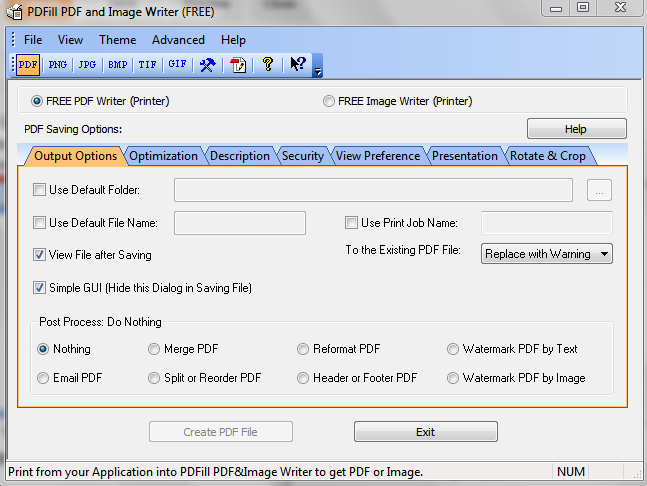
3. PDFill PDF and Image Writer (Free) - PDFill Image and PDF Writer is a free PDF printing and Image printing utility that lets you create PDF files and Image files form different applications running on your Windows PC. This utility is also free and it will not leave watermark.
As per its official website it works with Microsoft Windows 2000/XP/2003/2008/Vista/Win7
(32/64 Bit), but we have tested it with Windows 8 and features worked great for me.

Download PDFill Free from Official Website

Create PDF Free using PDFCreator 1.4.0

|0 comments
I was visiting through internet and we have got this excellent utility named PDF Creator. PDF Creator is at present in version 1.4.0. PDFCreator is a free tool to create PDF files from nearly any Windows application. PDF Creator v 1.4.0 supports all version of windows including Windows XP, Vista, Windows 7 and Windows 8. 
PDF Creator 1.4.0 works as a printer. When you will give print using Ctrl + P of any document then PDF Creator printer will show in your print option.
We advise you to pay attention when you are installing PDFCreator. It is an ad-supported application, which you can easily skip at the time of installation.


Besides the fact that PDFCreator creates documents in the PDF format, you can also select PNG, JPEG, BMP, PCX, TIFF, OS, EPS, PSD, PCL, RAW and SVG as output formats. Furthermore, you can combine several documents into one PDF file, and password-protect it.


Key Features of PDF Creator 1.4.0 :


Create PDFs from any program that is able to print
Security: Encrypt PDFs and protect them from being opened, printed etc.
Send generated files via eMail
Create more than just PDFs: PNG, JPG, TIFF, BMP, PCX, PS, EPS
AutoSave files to folders and filenames based on Tags like Username, Computername, Date, Time etc.
Merge multiple files into one PDF
Easy Install: Just say what you want and everything is installed
Terminal Server: PDFCreator also runs on Terminal Servers without problems
And the best: PDFCreator is free, even for commercial use! It is Open Source and released under the Terms of the GNU General Public License.


Download PDF Creator Latest Version
Share