Showing posts with label tips facebook. Show all posts

Submit your post to Tumblr, Linkedin, Facebook and Twitter automatically free

|0 comments
Every blogger expects a good traffic for his websites after doing a hard work on his blog or website. Today we have got a great online tool that can submit your blog post to Tumblr, Linkedin, Facebook, Twitter. The most amazing thing about this tool is that you do not have to submit your blog post manually after every post made by you. It will automatically post on behalf you. This amazing tool name is dlvr.it. You have work one time in your blog and it will work for you every time. Before going to submit your blog to social networking sites, you must have to create a feed for your blog. If you have already created feed for your account then just go ahead.

Create an account in dlvr.it, If have you not an account on dlvr.it. After creating the account login to your account and you will see on the left side :
Put your blog feed address in feed url. After that select which post you want to publish on these sites and click on next button. Now, you will see on the right side of the page.
Click on any icon in which you want to publish your blog post first. In my case we have clicked first facebook icon. After clicking on facebook you will get a window like this :
Now click on 'Log in with Facebook' button, and provide your user name and password of facebook. 
Click on Allow to allow button. Now it will ask for on which account you want to publish.
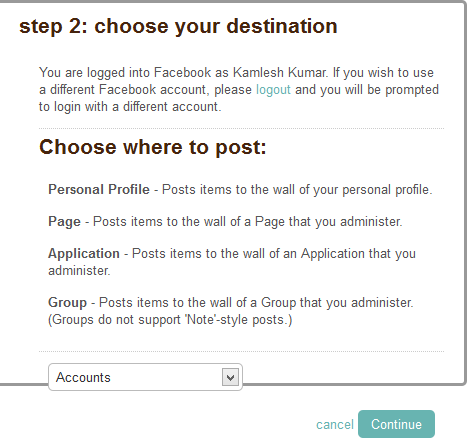
Click on Accounts tab and select appropriate account on which you want to post your article automatically and click on continue button. Now you will see a window like :
Here, on the left side your blog heading and right side facebook link page is available. Now you every post will be automatically posted to facebook.
To add another e.g Tubmlr, Linkedin, Twitter just click on +add button and follow the steps.

PUBLISH YOUR BLOG POSTS TO FACEBOOK PAGE AUTOMATICALLY

|0 comments
Facebook is the best social networking site which is widely used in the world. Every blogger give first priority to sharing his blog on Facebook. Now I am going to share with you the easiest and fastest way to publish your blogger posts automatically on your website's Facebook fan page. Now a days no one has much time to manually publish all blog posts on Facebook page too. But I'm glad you're here at the right place to learn that trick.


Before proceeding to these steps you must have a page on the facebook.


Publish Blogger Posts On Facebook


1. Log in to your Facebook account.
2. Now go to RSS For Pages App and click Install.
3. Now choose the page on your want to publish your blog posts.
4. Now click Add RSS For Pages and allow (Install) the app on your Facebook.
5. Write your website's title in Company Name field and write your Contact Number and check the box of Terms and Services, then press Save Changes.
6. Now write your Blog's feed address and choose the settings according to your need and press Save Changes.

Note: It may take time for your post to publish automatically on facebook after publishing it on your blog.
7. Now click on RSS for pages.
9. Its will open a new page in new tab in your browser.

10. Now you will your facebook page heading and below it RSS icon. Just click on RSS icon.
11. Now you will see you all latest pages of RSS feed has been synchronized. Now just click on Publish button on the right side of the article and your posts will be published on the facebook page as well as facebook account also.
If you have more than one blog and want to publish in same facebook account then you have to follow the whole steps from starting for another blog also.

Access Facebook without Internet on any Cellphone

|0 comments

Access Facebook without Internet on any Cellphone

Facebook is the most popular social networking in world. Today every people have account on facebook. People login to facebook though notepad, computer, gprs activated cellphone. I was also using facebook through internet only before this.

Recently I have got a message through Airtel that you can use facebook without internet. After getting the message i have searched a lot though the internet and collected the information, also i used the facebook without GPRS from my cellphone. The greatest feature of this article is that you can use facebook through the most basic phones like Nokia 1100, even without any GPRS connection.

I have shared some screenshot below :-
To use this service dial *325# or *fbk# from any mobile. You will receive a confirmation message asking you to give your username and password to access Facebook. Don't worry You will not be charged for this.
The service will shortly send you a menu via service message. Select the option that you want to use. You can even send a friend request using this service, that's is great. You can send and receive messages to your friends. You can check notifications, post on your friend’s wall and lots of more facility is available free of cost. To access your Facebook account and Status updates is completely free but if you want to use other features, you have to subscribe to the premium plan of this service which will not cost you much.
The main point associated with this service is that it is currently available in India on AirtelAircel and Tata Docomo & in Indonesia on XLcomTelkomsel.

Download your Facebook photos in a single ZIP file

|0 comments

Download your Facebook photos in a single ZIP file
I think today we all have friends on Facebook except some? Some of them are acquaintance, some are unknown, some are just friends and some are special to us. Now a days Facebook has become famous as a album. All are uploading the photos on facebook for sharing with friends, relatives


But sometimes we find that there are a lot of photographs in the album and when watching it online is not possible as it takes a lot of time. Using Facebook2Zip you can download those albums in one place and view them on your PC offline. There are many benefits of this idea. You can view the photographs later any time without having internet, you can make a cd or dvd of favorite album. When you will download its will be in zip format, later you can unzip through winrar software or any other zip software.

Here, we have uploaded a screenshot of web site. For downloading the photos you have to login first as you can see the above screenshot. Login with facebook account and follow further steps on the website as it prompts.

You can download your own albums as well as your friend’s albums. But you can download those albums only that you can access with your Facebook account. Moreover you can make an individual selection and multiple selections of albums, this is the benefit of this website. Visit this website www.Facebook2Zip.com and enjoy. 
Share
