Showing posts with label tips data recovery. Show all posts

EaseUS Disk Copy Home Edition 2.3.1

|0 comments
EaseUS Disk Copy is a 100% Safe Free Disk/Partition Copy Software. It is a perfect solution for free disk/partition clone for disaster recovery. EaseUS Disk Copy Home is a free disk/partition clone software for home users only. Regardless of your operating system, file system and partition scheme, through creating a bootable CD it can sector-by-sector copy you disk to assure you a 100% identical copy of the original one. It is a perfect free tool for Data Recovery Wizard to recover files from a backup disk.


Burning Feature : With built-in burning feature, it can automatically create a bootable CD/DVD or USB disk to copy entire disk easily.
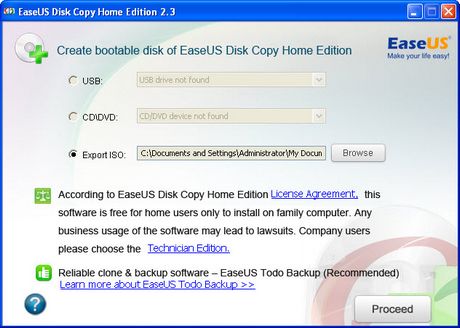
Disk copy: Clones one disk to another sector by sector with a bootable CD.
Sector by sector copy: Makes physical 1:1 copies (clones) of hard disks and partitions which ensure 100% identity to the original.

Partition copy: Copies one partition to another sector by sector with a bootable CD.
EaseUS Disk Copy Home is a potent freeware providing sector by sector disk/partition clone regardless of your operating system, file systems and partition scheme. The sector by sector method assures you a copy 100% identity to original. EaseUS Disk Copy can be used for copy, cloning, or upgrading your original small hard drive to a new larger drive. Simply speaking, it can copy anything from old hard drive including deleted, lost files and inaccessible data. So, the freeware is a perfect tool for Data Recovery Wizard to recover files from a backup disk. However, it cannot backup single file or folder, so reliable backup software - EaseUS Todo Backup with advanced features is recommended.


Key Features

  • It is a very safe and easy way to copy all or part of a hard drive to another hard drive with Disk Copy.
  • With built-in burning feature, it can automatically create a bootable CD/DVD or USB disk to copy entire disk easily.
  • Friendly graphical user interface.
  • Relay disk space for insufficient destination.
  • Support hard disks up to 1 TB.


Complete Recovery Software for Free : Macrium Reflect Free 5.0.4870

|0 comments

Users who are searching for a tool who can create Disk image, file backup and disk cloning for Windows for those there is a great tool is available Macrium Reflect Free. It is freeware for non-commercial use. Macrium Reflect can is a complete disaster recovery solution for your home and office. It protects your personal documents, photos, music and emails. Upgrade your hard disk or try new operating systems in safe knowledge that everything is securely saved in an easily recovered backup file. You can download Macrium Reflect Free 5.0.4870 from the link provided below after the article.
Features of Macrium Reflect:
  • Drag and drop user interface
    • New, more intuitive user interface supports drag and drop of partitions when backing up or restoring. With easy to use intuitive wizards and fast access to key functions, backing up and restoring is now easier then ever.
  • Server ReDeploy
    • Restore your Windows server operating systems to new hardware using ReDeploy for Servers which features a clean, simple and intuitive user interface.
  • WinPE 3.1 rescue environment
    • Includes the latest version of the Microsoft Windows Preinstallation Environment offering support for more devices along with USB 3.0 support.
  • WinPE driver support
    • Adding driver support to Microsoft WinPE has never been easier, Macrium Reflect will prompt to add drivers for unsupported devices in WinPE.
  • Linux 3.0 kernel
    • Includes the latest version of the Linux kernel providing greater device support which includes USB 3.0.
  • UEFI Support
    • Support for the latest UEFI motherboards with GPT booting.
  • Direct disk cloning
    • Directly copy one hard disk to another without creating an image file first. Partitions can be ordered and resized during this process.
  • Integrated email component
    • Send backup completion status email notifications with the new integrated email component.
  • Reorder & resize partitions
    • Change the order and size of partitions as they are restored.
  • Restore multiple partitions
    • Restore whole disks or multiple partitions in a single operation.
  • Backup destination rotation
    • Easily rotate backup destinations by specifying a list of alternate backup locations.
  • File & Folder backup NTFS permissions
    • Include NTFS access control lists (permissions) as part of a file and folder backup, these permissions can then be restored.
For first time use you have to provide your name and email address. It supports Windows XP / Vista / Windows7 / XP64 / Vista64 / Windows7 64. In my test it worked with windows 8 also.

How to Create a recovery USB drive in Windows 8 to recover your OS in Emergency

|1 comments

Windows 8 has been launched with bunch of hidden tools that are quite useful. But, we don't know how to use it. One great tool in Windows 8 is creating a recovery drive.

Recovery USB drive helps you to recover your system in times of unexpected crashes and memory losses. Windows 8 Release Preview is still in its testing stages of development, and it may take several more months before the final release is made to the general public.

So, it is better to plan in advance to recover data in case something goes wrong. In this tutorial we will show how to create a recovery USB drive in Windows 8. Make sure you have a formatted USB external hard drive or pen drive, which is more than 256 MB free space.

1. Open Run (Windows Hot Key + R). Type in recoverydrive.exe and hit Enter from keyboard or simply click on OK button.
2. In the next window, click Next.
3. Select your hard drive from the list and click Next. The recovery USB disk shall be made within a few minutes.

Recover Deleted Files from Removable Media like USB Drive

|0 comments
Recover Deleted Files from Removable Media like USB Drive
It is the primary nature of human to do the mistakes and it is due to mistakes that we often come across situations when we have deleted files and other data either from computer hard drive or from removable drives like memory car, pen drive

Fortunately in the computer we have Recycle Bin to undo delete operation but what if you have deleted data from Pen Drive or USB drive which doesn’t have any recycle bin to restore the deleted data?

Hence, we are sharing with you some great emergency tools to recover the deleted data.

1. Eeaseus data recovery wizard free - This is a great tool. No other tool is as good as this. Hence, we have kept it at no. 1. It comes free as well as profession version also.
It has many feature. It can be used to recover data from all types of removable media as well as hard disk. It can be downloaded from here for free. But, in freeware version it supports only 1 GB data recovery.

2.  Recuva File Recovery - This is the another great tool. It also comes as a freeware. Recuva recovers files deleted from your Windows computer, Recycle Bin, digital camera card, or MP3 player. It can be downloaded from here.
When you will run this utility its will ask to you what type of file you want to recover like pictures, music, documents, video, compressed, emails, other. 

3.  Removable media data recovery Software - It recover files and folders from various USB storage devices. Data recovery application supports easy file recovery from removable media and mass storage enabled Portable Flash Memory Devices, MP3/MP4 Players, Digital Audio Players, Portable Media Players, Portable Gaming Systems and even mass storage data connection enabled Mobile Phones. Simple to use utility regains various types of files saved in major file formats including mpeg, midi, jpg, bmp, jpeg, gif etc from your deleted, corrupted removable media. Software smoothly functions on major Windows OS platform for safe data recovery. It can be downloaded from   here.

4.  PC Tools File Recover - PC Tools File Recover is a safe, affordable and easy-to-use file recovery solution, designed to recover and restore deleted files from hard drives and other types of fixed media.  It utilizes a rapid scan engine to scan and restore your documents from your hard drive, usually within minutes! It can be download from downloaded or purchased from here, as it comes as trial.

Recover data from corrupted cd / dvd

|0 comments

Recover data from corrupted cd / dvd
Sometimes, CD or DVD get corrupted through improper use or when it gets old after several use. Sometimes it get corrupted by human mistake. Hence, i am going to share some freeware software to recover data from optical media.

1. CDCheck - CDCheck is a utility for the prevention, detection and recovery of damaged files on CD-ROMs with an emphasis on error detection. With CDCheck you can check your CDs and discover which files are corrupted. From this software you can check the health of CD. Unfortunately it does not support DVD. It is a free utility. It can be download from here.

2. Unstoppable Copier - It is available for Windows and Linux both environment, this free utility can copy files from disks with problems such as bad sectors, scratches or that just give errors when reading data. When computer is unable to copy a file from a damaged disk it will abort and delete the portition of the file it has copied. This program however will continue to copy the file right to the end. Any data that is not recoverable after many retries is replaced with blanks. It can be downloaded from  here.

3.   IsoBuser   It supports CD / DVD / BD / HD DVD / HDD / Media card / Flash disk formats and all common file-systems . Isobuster has tons of data recovery features and the basic version is free of cost. Hence, you can utilize the best utility for recover your data from CD and DVD. It can be downloaded from here.

4.    CD Recovery Toolbox -  It can recover your corrupted CD's data. It is also free of cost. It can be downloaded from here.
Share
