Unlock Huawei E-173 3G Data Card

|0 comments
Unlock Huawei E-173 3G Data Card
By default data cards comes with locked to a particular network. You can not use other network provider SIM. Here you have only the way to use other network provider data card is to unlock it. Follow the simple steps to unlock Huawei E-173 3G Data Card for free.


Steps :


1. Download the Universal Master Code generator from here or you can download the Huawei Modem Unlocker by bojs 5.8.1 from this article to calculate the code flash and unlock for your modem.
2. Now plug the modem and let it install all the software.
3. Run Universal Master Code generator.
or you can run Huawei Modem Unlocker by Bojs 5.8.1.


3. Now enter the IMEI number which is printed on the back side of your modem.
4. Now unplug the modem.
5. Now insert a different Sim like Aircel or Idea or Airtel  (Different form the Data card provider)
6. You will be asked for the unlock code,enter the unlock code to unlock 3G data card. (If not asking for unlock code then proceed with next step.) 
7. Now download and install Huawei E-173 Firmware  (Download Huawei E-173 Firmware) to update your firmware.
8. If the flash code or the Unlock code is asked enter the respective code previously generated.Its all done.
9. Now download the  Huawei Mobile partner Software (download it from here)This software is a GUI to create a new profile to connect to the internet.
10. Now create a new profile by navigating to Tools - Options - Profile Management
11. Now enter the APN and save the profile and click on the connect button.

These above steps will unlock your 3G data card permanently. Now you can use any SIM of any network provider. If any problem just leave a comment and I will help you at the earliest.

Unlock AIRCEL Micromax MMX352G Data Card Netsetter

|0 comments

Unlock AIRCEL Micromax MMX352G Data Card Netsetter
Aircel Micromax MMX353G Data Card Netsetter can only be unlocked by upgrading the firmware. Don't try this method with other modem.

Requirements :

1. PC should be on full battery.
2. Download the firmware for AIRCEL Micromax MMX353G Data Card from here.
3. Close all running of modem.

Steps to Unlock Micromax MMX352G data card of Aircel :

1. Plug-in the usb modem in your computer.
2. Close the aircel mobile partner software (Aircel mobile partner software starts running automatically when you insert the modem in your PC)
3. Extract downloaded firmware zip file and Run the MMX352G_MICROMAX_INDIA_V5.497_M_8.3.7.1.17_Google.exe file
4. Click on Start button.
5. Wait till the time setup process completes.
6. Remove the USB Modem.
7. Restart your PC/Computer.

Done!, Your modem is now unlocked and you can use any SIM in the usb modem.

Best Compression Software for free

|0 comments

Best Compression Software for free
WinRAR - WinRAR is the best free compression software for windows pc. It comes for free for 40 days but after 40 days also you can use it for free by just clicking on close button. It supports maximum good formats like : RAR, ZIP, CAB, ARJ, LZH, ACE, TAR, GZip, UUE, ISO, BZIP2, Z and 7-Zip file formats. WinRAR uses 128 bit password encryption and authenticated signature technology.WinRAR automatically recognises and selects the best compression method for file and folders. WinRAR supports password encryption also. WinRAR can break big files into small pieces, which is easier to transfer from one place to another. WinRAR comes for 32 bit as well as 64 bit version also.
7-zip - 7-zip is other good program for compres files and folders. The free 7-Zip unpacks a host of archive formats, including ZIP, TAR, GZ, and its own 7z format. Unlike WinZip, though, it can create TAR and GZ archives, which are commonly used on Unix and Linux systems. The program's ability to shrink files is stunning. 7z archives file and folders up to 40 percent smaller then their ZIP equivalents, although compression did take longer, and the highest compression settings can hog system resources. Advanced options include the ability to create solid and self-extracting archives, and to adjust the compression level and password protection. 7-zip also comes for 32 bit as well as 64 bit version.
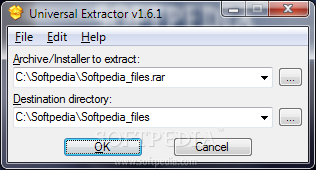
Universal Extractor - Universal Extractor is another good compression utility which comes for free to use. During setup, you can enable Explorer context menu integration, such as Add UniExtract Files, Add UniExtract Here, and Add UniExtract to Subdir.
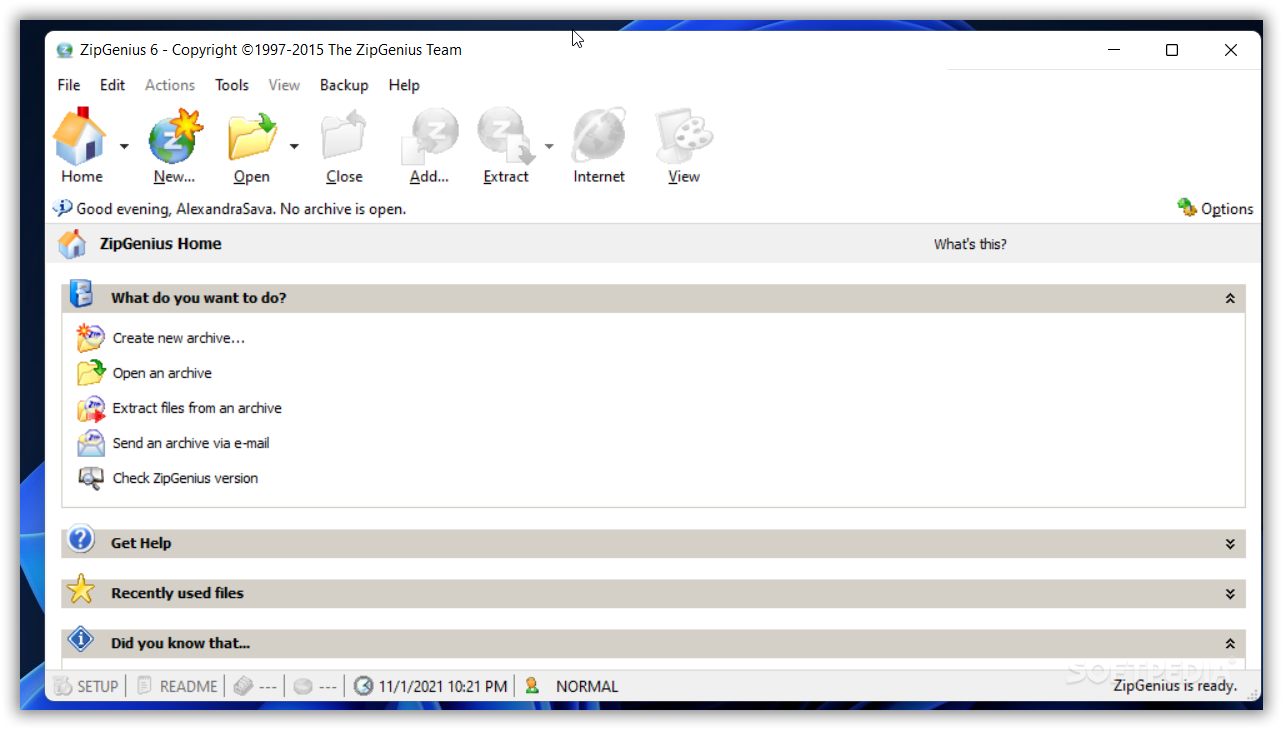
ZipZenious - ZipZenious is a very good for archiving. Its interface is extremely user-friendly, and completely different from what we already know. The menu looks as if the software is actually integrated into Windows. When you choose to extract an archive, you can select all files, only selected files, or only files with a certain format. In Options you can set ZipGenius to ask before overwriting on existing files, as well as open the destination folder once the operation is a success. ZipGenius is pretty fast, in comparison with other compression tools, but sometimes it takes a little while to perform a task. Also, CPU and memory usage is pretty high most of the times when using ZipZenious.
WinUHA - WinUHA is another free compression tool. It can create, extract and test archive also.

Make bootable USB of Windows 8 using WinUSB Maker

|0 comments

Make bootable USB of Windows 8 using WinUSB Maker
Installing windows from USB takes less time than installing windows from DVD. We have written another article also about Make Bootable USB of Windows 8. I have found WinUSB Maker software is a great utility for making Windows 8 Bootable USB device. WinUSB Maker latest software can be downloaded from here for free.
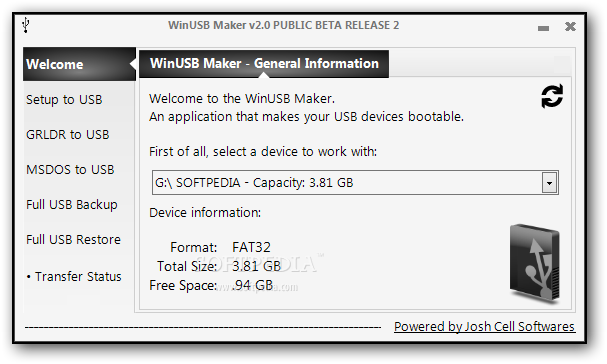
WinUSB Maker software supports Windows XP, Windows Vista, Windows Server 2008 /2011 family, Windows 7 and Windows 8 including 32 bit and 64 bit software. WinUSB Maker has a great user interface as you can see in above screenshot. WinUSB Maker can make bootable any external media including external hard disk. It supports external media larger than 1 TB capacity. WinUSB Maker can work with Setup DVD / Setup Folder / Setup ISO Image. It force dismount all devices, forcing the format if the device is in use. It can make a DOS / GRLDR automated Bootable USB Disk also. It capture only removable devices. It refresh all devices in a single click. It can backup the full external drive also. But bad thing of this software is that for using this software you need Microsoft .net framework 4.

Software for making Windows 8 Bootable USB

|0 comments

Software for making Windows 8 Bootable USB
Installation of windows 8 from flash drive is a great idea. It takes less time than installation through DVD and useful for that people who has no DVD drive. Here, we have updated some good free software which can create USB Flash Device for you.

1. Microsoft Windows 7 DVD/USB Tool - Microsoft Windows 7 DVD/USB Tool is the best way to make bootable Windows 8 bootable USB. I have already covered about this tool in this post.
2. WinToFlash - WinToFlash is another good software which can create bootable USB device for you including Windows XP, Vista, Windows 7 and 8 also. You can use iso image or windows 8 source file for creating Bootable USB device. You can download WinToFlash from here.
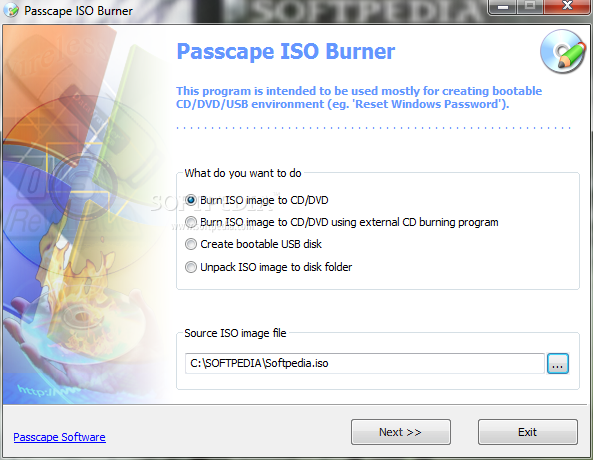
3. Passcafe ISO Burner - Passcafe ISO Burner is another great tool which can create bootable cd/dvd and USB stick also. Passcafe ISO Burner can be downlaoded from here.
4. Bootable USB Drive Creator - Bootable USB Drive Creator is another great tool for creating a bootable USB flash drive. Bootable USB Drive Creator can be downloaded for free from here.
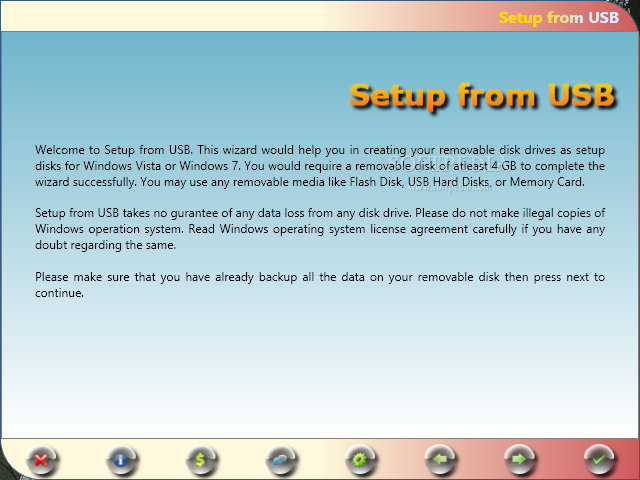
5. Setup From USB: Setup from USB can also create a bootable USB for you. But, it does not support iso image, hence you have to extract is first. (You can read this article "extract iso file to hard disk" for extracting iso to hard drive.) It can be downloaded from here.
6. Bootsage Flash Builder - Bootsage Flash Builder can also create bootable USB disk for you. It is simple to use. Bootsage can be downloaded from its official site from here.
7. EasyBCD - EasyBCD tool has many great tools including it can create a bootable USB flash device for you. It can be downloaded from its official site from here.
8. Command prompt - You can create Windows 8 bootable USB flash device using command prompt also. You can follow this guide for the same. 

Indian Free classified sites list

|0 comments
Indian Free classified sites list
We have updated here 86 classified websites list. All are free, easy to use and also same design. You can post in these websites international ads also. Your ad will be display on these sites 100 days. You can increase your business traffic using these sites.
http://www.aboaret.in/
http://www.ackmel.in/
http://www.aclerylh.in/
http://www.altrary.in/
http://www.alunion.in/
http://www.amalate.in/
http://www.arenite.in/
http://www.astelean.in/
http://www.bayphi.in/
http://www.beacom.in/
http://www.becki.in/
http://www.chewyone.in/
http://www.counda.in/
http://www.criss.in/
http://www.dorstnik.in/
http://www.ebagspi.in/
http://www.enteth.in/
http://www.free-classified-list.in/
http://www.freecommunityclassifieds.in/
http://www.gagent.in/
http://www.gamiders.in/
http://www.geoclassifiedadspost.in/
http://www.hickm.in/
http://www.hostler.in/
http://www.incipco.in/
http://www.indialistadsads.in/
http://www.indialovepostingads.in/
http://www.inelly.in/
http://www.infopostingads.in/
http://www.ingreak.in/
http://www.ingsco.in/
http://www.inwarmio.in/
http://www.justaroundtown.in/
http://www.justfreepostads.in/
http://www.khands.in/
http://www.kisuk.in/
http://www.lechlon.in/
http://www.lifetimeadspost.in/
http://www.listaboo.in/
http://www.liveadspostads.in/
http://www.localpostads.in/
http://www.londonfreeclassifiedads.in/
http://www.longerclassified.in/
http://www.loveadspost.in/
http://www.makeyourmarkads.in/
http://www.malaysiapost.in/
http://www.mallclassified.in/
http://www.manned.in/
http://www.mcgrab.in/
http://www.mclewa.in/
http://www.melodyclassifiedads.in/
http://www.metro-ads.in/
http://www.midnightmadnessads.in/
http://www.milkeyclassifiedads.in/
http://www.moodyadsads.in/
http://www.moodyclassifiedads.in/
http://www.myadfindads.in/
http://www.nacele.in/
http://www.narmadaenterprises.com/
http://www.networkclassifiedads.in/
http://www.ochism.in/
http://www.ostoug.in/
http://www.paneltradeads.in/
http://www.perfectdone.in/
http://www.phicat.in/
http://www.pictomoneycommunity.in/
http://www.pontligh.in/
http://www.portelpostads.in/
http://www.puden.in/
http://www.queiss.in/
http://www.rasmain.in/
http://www.salynxtg.in/
http://www.saport.in/
http://www.scimand.in/
http://www.sclemeca.in/
http://www.septe.in/
http://www.shiede.in/
http://www.sidecti.in/
http://www.stonfund.in/
http://www.stryst.in/
http://www.tablery.in/
http://www.topsadi.in/
http://www.tresen.in/
http://www.weddi.in/
http://www.werscata.in/
http://www.woodbug.in/

Create Windows 7 / 8 Bootable USB Device

|0 comments

Create Windows 7 / 8 Bootable USB Device
Microsoft has released Windows 7 DVD/USB Tool at the time of windows 7 release . Windows 7 DVD/USB Tool is great for making bootable USB. Windows 7 DVD/USB can still make Windows 8 USB Tool. Procedure are same for making bootable USB for both Windows 7 and Windows 8. I am showing the procedure for windows 8, you can follow the same steps for windows 7 also.

Note : Before starting you need  a USB device at least 4 GB memory and .iso image of Windows 8 Bootable DVD. Take the full backup of USB before proceeding.


Steps to follow :


1. Download the Windows 7 DVD/USB Tool from here and install it.
2. Run the program and browse for Windows 8 .iso image file. Select Windows 8 .iso image file.
3. In this steps you have to choose media type as USB device or DVD, choose USB device because we are going to create a bootable USB for Windows 8. (You can create DVD also through this way)
4. Select the USB device from the dropdown menu and click on Begin copying button.
5. Now its will take some time to create a Bootable USB for you.
After all this steps get finished you are ready to boot from USB device.

Important Notice : By installing Windows 8 through USB Device you may get a error “CD/DVD device drive is missing” dialog, then click on Cancel button. This action will take you to the welcome screen.

Now, remove your bootable USB flash drive and reconnect it to a different USB port. Windows installer should now detect the drive and you should be able to continue the installation.
You may like this also :

Find Similar Sites Using Add-ons "Similar Sites"

|0 comments

Find Similar Sites Using Add-ons "Similar Sites"
Finding similar type sites to internet is not a difficult task today. There are many sites on internet who claims to find similar sites using their search engine. You can find similar sites using google search engine also. Now I am going to publish, find similar sites using add-ons. You can find similar sites through http://www.similarsites.com/ search engine also. 
You can search similar site using some keywords (like - classified sites) or website name (like - www.google.com) also. It will show many results with similarity %. SimilarSites has also made a great add-on for finding similar sites. SimilarSites add-on is compatible with most browsers like : Internet explorer, opera, chrome, firefox, safari etc. This is a very great tiny utility "Similar Sites" add-on which will help you to find similar sites without any search engine help. You can download the add-on from official sites also. I am providing article through firefox.

How to use "SimilarSites" in firefox :

1 Install this Add-on from official site or you can install it from the link provided below.  
2. After installing it you will get a S icon on the extreme right upper corner of mozilla firefox. (I am using Firefox 12.0)
3. If you can't see the S button (for earlier version of firefox), then to add the icon just simply go to blank space on one of the toolbars, and select customize from the context menu. You will find the S-icon in the new window then drag and drop it into any of the visible toolbars.

4. After doing all these steps, whenever you want to search similar websites of any website, from the homepage of that website simply click on this icon (S icon) and a window will display the list of related websites with a small screenshot, site’s name, description and web address. You can then click on any of the website from the list and surf it.

In our view this add-on will really help you a lot as you can locate many similar websites comfortably.

Bypass Windows Logon Screen with Kon-boot

|0 comments

Bypass Windows Logon Screen with Kon-boot
On my previous post Bypass Windows Logon Screen With Utilman I have talked about how to bypass windows logon authentication screen without using any software. Today I am describing Bypass Windows Logon Screen with Kon-Boot. Kon-Boot is an application which will bypass the authentication process of a Windows logon screen as well as Linux. Kon Boot can work on either a USB flash drive, CD-ROM, or floppy diskette. Kon-Boot does not change your windows old password even and it does not change your system file. Kon-Boot software has been designed for the people who have lost windows administrator password.
Kon-Boot comes for free as well as commercial version also. Free Kon-Boot version does not support 64 bit systems and Windows 7. It also does not include privilege escalation feature.

Commercial Kon-Boot version works with both 64-bit and 32-bit Microsoft Windows operating systems and also include privilege escalation feature. Commercial Kon-Boot supports Windows 7 also.

I have personally tested the free version of Kon-Boot on a virtual machine of Windows XP and its works great. I was able to login in administrator without prompting password.

You can download the Kon-Boot from its official site.

Huawei Dashboard Tool v 0.0.0.7

|2 comments

Huawei Dashboard Tool v 0.0.0.7
I have already discussed about huawai dashboard tool which can change the dashboard of your huawei modem in this tutorial, but problem is that it is in Beta now. It's will take some time to get final version. Hence, I am updating here a very good tool know as Huawei Dashboard Tool v 0.0.0.7. I have personally tested this tool with many Huawei Modems. It's a great tool for Huawei users. Huawei Modem Dashboard Tool v 0.0.0.7 can be downloaded from here. (If download link not work then let me know. I will provide new download link for you.)
How to use step by step :
1. Download any Huawei Dashboard from internet.
2. If downloaded file is already in .iso then continue with next step, if not in .iso then use folder2iso software for creating .iso file.
3. Now run Huawei Dashboard Tool.
4. Click on Select button of "Input ISO image file" and select your .iso file from here. 
5. Now click on Select button of "Output dashboard installer file" and select the path where you want to keep new dashboard .exe file.
6. After all the above step click on "Create dashboard" button.

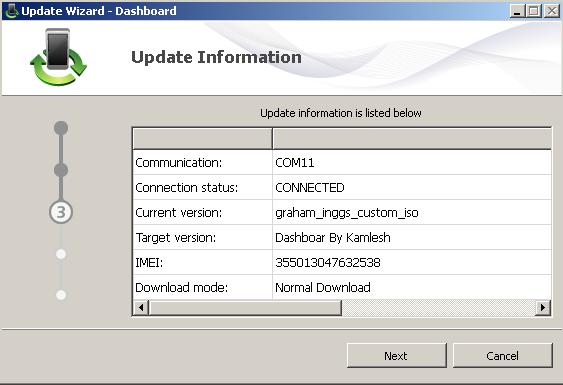
After a few minute you will see a .exe file has been created on your specified location. For updating your modem with new dashboard insert your modem to your computer and let the modem to install driver in your pc. After all this double click on dashboard which you have created. It's will open a new windows as in screenshot below :
Just select the radio button of "I accept the agreement" and click on Next button. It will search your modem port on which your modem is connected and you will see a screen like :
Click on next button and after a few seconds you will see a screen like :
Its will start downloading the software in your modem and after a few seconds you will see a screenshot :
You have done all the steps, now your modem has a new dashboard.

Note : Before doing this process make sure that battery is full. Do not shutdown or log off your PC, otherwise your modem may be corrupt. By doing this process your warranty will be lost.

Huawei Modem Dashboard Creator/Writer Tool

|0 comments

Huawei Modem Dashboard Creator/Writer Tool
Now a days 3G modem (also known as dongle) is very famous in the world. Many network provider has launched 3G dongle of many companies. Here, in this article I am going to discuss about Huawei Modem. Huawei Modem is leading in Modem area. It has launched various types of modem in market through Network providers. But, the problem is that all network provider puts customized software on his modem. If you want to change or upgrade, then its is not possible through normal way. Hence, we are suggesting you a good Huawei Modem Dashboard Creator / Writer Tool. Huawei Modem Dashboard Writer tool can create a dashboard from your ISO downloaded through internet and you can upload that dashboard in your modem through a simple steps.Huawei Modem Dashboard Writer Tool can be downloaded from here. Huawei Modem Dashboard Writer Tool is free of cost. You have not to pay a single penny also for this great tool. It supports all Huawei modem. It is currently in beta version, hence before changing the dashboard of your modem please take backup of your modem. It might not work with some new Huawei Modems. Say thanks to  DC-Unlocker team who has done a great job.
Huawei Modem Dashboard Creator/Writer Tool has many features :

-It can Create dashboard.
-Write dashboard to Huawei modem.
-Suitable for various Huawei modems.
-No dongle required for beta test.
-Huawei Profile Editor added.
I have not personally tested it yet, hence I am not taking any responsibilities that It will work for you or not. This software can damage your modem, hence do it on your own risk. 

Remote Desktop Sharing Tool Free

|0 comments

Remote Desktop Sharing Tool Free
I have already covered about "Remote Desktop Access or Share Desktop over Internet" using team viewer software. Now I am suggesting you some other software, through which you can access remote desktop of other PCs.


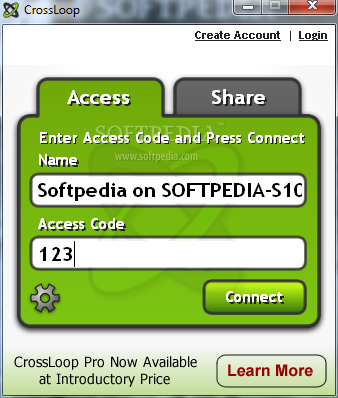
1. CrossLoop - CrossLoop is another free software for access remote desktop. CrossLoop is easier than TeamViewer software.It only takes a few minutes to setup and no signup is required. CrossLoop is a secure tool to remotely assist any PC in the world. 
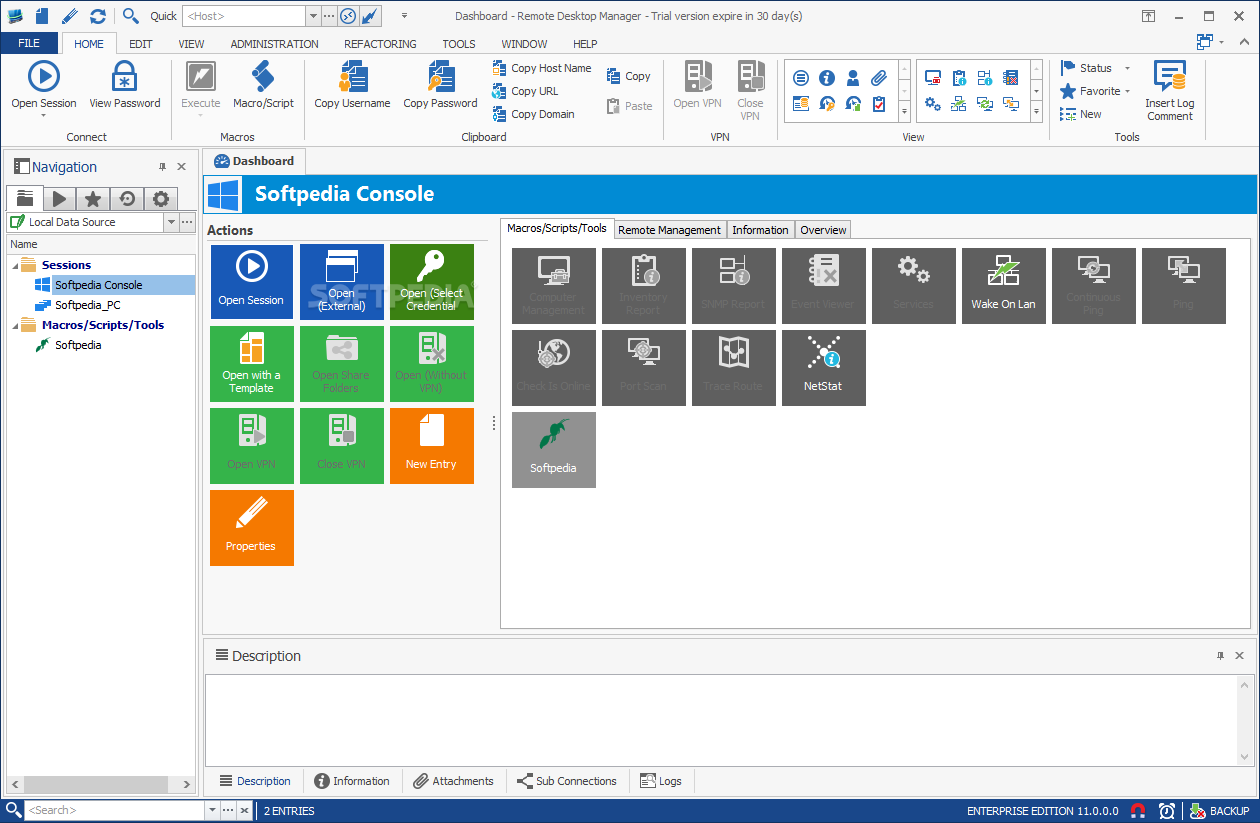
2. Remote Desktop Manager - Remote Desktop Manager is a another great tool for share your remote desktop over the internet. With Remote Desktop Manager you can add, edit, delete organize or find your remote connection quickly. Compatible with Microsoft Remote Desktop or with Terminal Services, it's a good replacement of the Remote Desktops Snap-in. But It requires Microsoft .Net Framework 3.5 for installation. 
3. Remote Desktop Web - Remote Desktop Web is another a good free remote desktop utility. Remote Desktop Web is a Java AWT application that enables HTTP clients to connect and control mouse clicks and keyboard presses via a web interface. 
I will soon update some other good software. It in your knowledge some good software is available then you can leave a comment.
Share